Showing posts with label Flip Your PD. Show all posts

Saturday, July 22, 2017

Leading with Coffee and PJs


As an instructional leader it is very important you are providing your staff with opportunities to learn and grow professionally. This summer I challenged myself to indulge in as much educational reading and online PD to grow as leader. I want to inspire others to become lifelong learners also.

In the book Lead Like a Pirate and one of my PLNs I learned of the digital newsletter Smore. The administrator who shared Smore stated that she uses it as her quickly newsletter and include an article for teachers to read. I started playing around with it to see how I could implement Smore this school year and it came to me...

I can use Smore to share mini PD to my staff. What a great way to provide them with things they can view or read to help them grow professionally. While trying to find the best title for the newsletter, I came across the picture...


It is not my own, but I decided to use it as the title for the newsletter: PD in PJs. So as I sit here writing a few blog post, I will end my "Me Time" this morning with a little PD and coffee (and yes I am still in my PJs).


What a great tool to use as a 21st Educational Leader to promote lifelong learners in your building! I will provide literacy, math, tech, and an article for educators to use to grow professionally. As we begin school, observations allow me to intentionally create the PD to share. Check our Edition 1:

Smore - PD in your PJs Series:


Friday, August 7, 2015

The Triple Threat to Data Driven Instruction

I have to begin my saying I excited to be a part of an amazing administration team...post coming soon! "I'm way up, I feel bless." - Drake

Today's post is creating formative assessments and digital data walls for math using Google Forms, Flubaroo, and Pivot Tables.


We know that data drives instruction and it is important that our teachers are continuously assessing students to gather data to inform them on student's strengths and weaknesses.

Typically teachers uses quizzes, homework, and test to gather data on student progress. Grading 20 or more papers, can be an overwhelming task. Not to mention, sometimes teachers do not have time in the day to immediately grade these assessments and provide students with immediate feedback before they move on.

21st Century digital tools can help teachers create opportunities to assess students, grade it, and provide immediate feedback. Digital tools like Kahoot, Geddit, and Socrative are a few tools that can assess student's understanding and provide immediate feedback!

Since I am a lover of Google...I created formative assessment tools for our staff to use in math called, Daily Quality Checks (DQCs).


The Daily Quality Check strategy will be a formative assessment exit slip that will allow teachers to adapt and differentiate their planning and instruction and assign students to interventions and enrichments.

Each nine weeks, I will create a template for teachers that includes the required standards for the nine weeks. As a team, teachers will develop 3 questions that will assess student's understanding of the topic. Teachers will create 1 DQC for each lesson. 

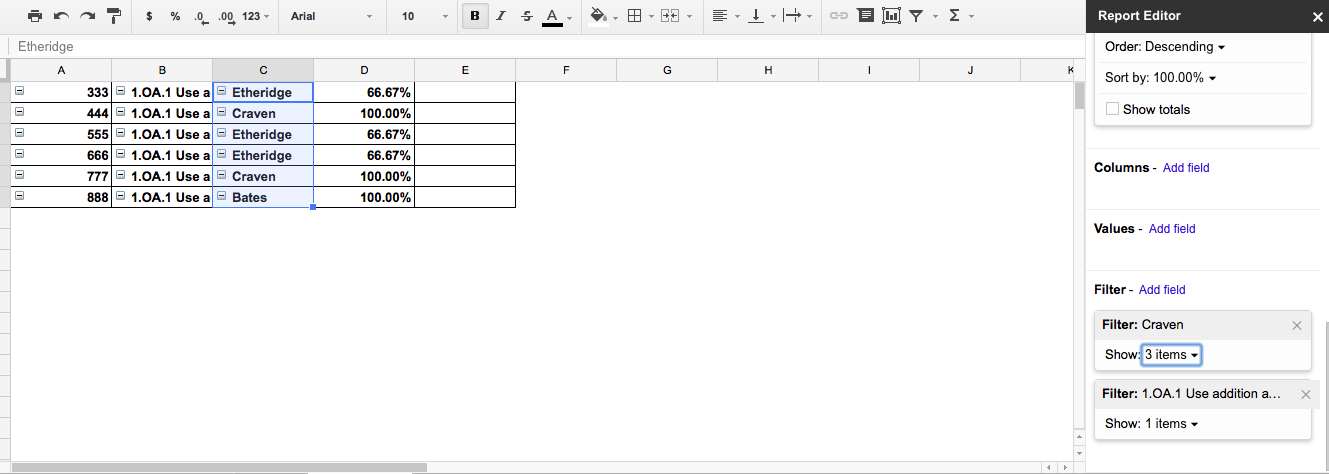
Only one DQC will be used for the team. When teachers create their Pivot Table Reports, they are able to pull their student's data.  Pivot Tables will be used as our digital data wall and used to helped each grade level to organize grouse for interventions and enrichments.

Pivot Table


Teachers will use the add-on Flubaroo to quickly grade the assessment. Fluabroo is an add-on that will automatically grade the forms, gives a summary of the responses, and emails students their results!!!!!

Flubaroo Spreadsheet

Email Letter to Student


Administrators will have access to the spreadsheet to monitor and support instruction.

Here is an example of the Form: Sample Daily Quality Checks 

There are many video tutorials to help you trainer staff on creating Google Forms and using Flubaroo and Pivot Tables. My favorite blog is Alice Keeler. Check her out!

To Flip our PDs, I have created video tutorials for our staff.
Creating and Sharing DQCs
Grading DQCs
Emailing Students and Feedback 

Check out tools to Flip your Staff Meetings and PD!

Be sure to leave a comment, follow me on Twitter @FITinEDU,  and subscribe to my blog!