Showing posts with label Google in Education. Show all posts

Tuesday, November 28, 2017

FOCUS Walkthroughs


We all know that it is critical that we are training our teachers in the latest research based strategies to give them an opportunity to be great for our students. Pouring into a teacher the knowledge required to be successful helps ignite their passion, purpose, and pursuit of excellence. It is a fact that professional development is an important factor in student achievement. They also help improve a teacher's performance levels. Professional development opportunities should be ongoing and aligned with the district's and school's goals. It is important that we invest in our teachers. The investment have a return called student achievement.


So how would you know when your teachers need training? That's easy...visit classrooms and then provide feedback. Daily walkthroughs should be informal and are essential in being able to identify what teachers need to be their best in the classroom. Spend as much time in the classrooms as possible. Start your week with a list of at least 5 classrooms you will visit each day. Walkthroughs should be no longer than 5 minutes. Pick one or two focus areas and only focus on that during your walkthroughs. Your goal is to FOCUS on specific things that teachers can work on each week to become a better version of them.

In one of my PLN groups, I decided to participate in the 500 walkthrough challenge. That's right, complete 500 walkthroughs this year...in 180 days!  I decided to call these FOCUS Walks -nonjudgmental and non-evaluative opportunities for growth. 

Find a few things to focus your walkthrough on.
Observe your focus area of the walkthrough.
Create a list of strengths and weaknesses.
Utilize the students to share what they are learning.
Send the teacher specific feedback on the walkthrough

You can create a Google Form and use Autocrat to create a feedback form, leave a post-note, or leave feedback using your Rocketbook Everlast. Your feedback should be specific and over ways for teachers to grow professionally.

I decided to take our observations and break them down to use for the FOCUS Walks. Each week I will focus on a standard and integrate our district's CCRP to help grow teachers. Using the Google Form, I am able to use Autocrat to create an automatic feedback form to share with teachers.

#500walkthroughs

I am an aspiring educational leader. Please view my Educational Portfolio if you are interested in an innovative instructional leader to lead and inspire, feel free to contact me.

Copyright 2017 Felecia Young
All Rights Reserved


Saturday, January 21, 2017

Going Goo Goo for Google!


I became a new Assistant Principal last at an elementary school. I was very excited to begin my new role with the opportunity to bring my passion for technology to help transform our procedures for discipline, walk-throughs, data analysis,  calendars and more.

I love Google and all that is has to offer to help school leaders become digital and efficient.

First let me begin by saying I am not a Google Certified Trainer. My passion and drive gave me the opportunity to learn how to use Google to become a 21st century educator...now leader.

Paperless Discipline Referral - 
I created a Google Form that will be shared with our staff to use for our discipline referrals. Your form can be created specifically for your school's need. The administration team will be collaborators on the form and the results. Be sure to include all of your administrator team as collaborators for both the form and results. When teachers complete the form, we will get an email to notify us that the form was completed. Notification settings is found in the results spreadsheet. Once we have met with the student and assigned the consequences, a letter is generated using the Add on Autocrat that summarizes the discipline form and includes the administration actions. This letter will be emailed to both the teacher and parent(s).  A copy of the letter will be kept on file using Google Drive Folders.

Data will be generated that can be used to help decrease discipline. Pivot tables can be use to organize data for specific needs.

With Google, you can also create a mobile app for your devices using the Add on, AppSheet.


The App
My principal has an amazing Discipline System that has reduced his OSS from about 90 to 20...he will have to share this!  With his system and our Google Referral Procedures, we will be digitally transformed.

The Form

The Letter


Walk Throughs will be done the same way. A Walk through Observation Form will be created using Google Forms. This form will only be shared with the Administration team and our Instructional Specialist. Autocrat will be used to provide feedback to teachers immediately! Although I didn't mention this for the Discipline Referrals, one of the best reason I love Google Forms is for the data! 

And of course, an App can be created for the Walk Throughs too!
The same resources can be used, but once you have done it once, it becomes easier.


The Digital Data Wall
To help us analyze data to drive instruction, teachers will use common assessments and a Google Form to share their results. The link for the form will be provided for each teacher. Teachers will input information such as standards assessed, number of students assessed, and number of proficient students. 

The form and results will be shared with the Administration team and the Instructional Specialist. The data from the spreadsheet will be used to generate educational conversation to help drive instruction and improve student achievement. 

Pivot tables in the result's spreadsheet can be used to help analyze the data. Check out: Alice Keeler's post on Pivot Tables, Pivot This.


To help us all stay organize we created Google Calendars for everything...After School Detention, Bus Duty, Observations, and our (the Administration team) personal calendars. All the calendars can be shown on. Google Calendar has many options...you can share calendars, set alerts and reminders, and more. I love having the Google Calendar App because I can immediately few in on phone for easy access.
Web Version
App Version

So, let me say this again... I am not a Google Certified Trainer! I learned through tutorials how to use Google as an effective tool for our administration team. 

I am grateful to be a 21st Century administrator. When I was in the classroom I used technology to help student achievement...now as an Assistant Principal I am using it for student achievement and teacher growth! 

I will continue to post how I am using technology in my role as as administrator, so be sure to subscribe to the blog  http://fitinedu.blogspot.com and follow me on Twitter @FITinEDU. 


Written By:
Felecia Young
Assistant Principal 
Hanford Dole Elementary School 
Salisbury NC
January 2017

Tuesday, December 29, 2015

Apple Watch for the 21st Century Administrator

It has been awhile since I blogged because of my new duties and role. I am busy trying to balance work, home, and me time! Thanks to Santa (and my family : )) I received a new Apple Watch for Christmas this year.

I got the black/grey sports band 42 mm. I must say that I am loving all the features thus far. I am still learning how to use it and what apps would help me with balancing everything. So far this is what I am loving about the watch...


1. Instant calendar notifications on my wrist. No more looking at my phone to see what meetings I have.

2. Speak to text feature...I can reply to messages and emails with the speak to text feature. This will make responding to all my emails I receive at work within seconds. It may look crazy of me talking to my wrist, but they'll get over it.


3. I can use Keynote and Powerpoint on my Watch to control my presentations. How awesome is that.


4.  The Apple Watch works well with Outlook...it allows me to view both my emails and calendar in one location.


5. The most amazing function of the Apple Watch is using IFTTT. This wonderful app is called If Then Then This. It gives your phone and Apple Watch the opportunity to be your personal assistant.

As an administrator, I am using DO Note with my Apple Watch to create Google Docs, add to my Google Calendar, and add to Google Spreadsheets using the speak to text feature. Check out this video from Paul Hamilton. This is where it all began...
This will definitely save me time, when I want to type a document for our staff or just a note for me. I am a fan of Google Drive, so this added feature is a bonus for me.


 I am using IF to give me instant notifications throughout the day for everything from meeting reminders, weather notifications, meditation reminders, and more.  I plan to be a 21st Century educator. It's a simple way to connect between products you use every day. So far I have created a connection when I Tweet, it is posted to FB; when I post a pic to Instagram, it is posted to FB and Twitter; a Google Spreadsheet that curates all Tweets from @God_Loved (you can choose whatever); a SMS to my phone when the weather calls for rain; and when I blog, it will automatically post to my FB and Twitter account.

I will continue to play around with the If-Thens later! I am just learning this, but I used YouTube Tutorials for ifttt to guide me through the process. It was very easy.


If you have an Apple Watch and have some other ways it can help administrators or educators, please
leave your best Apple Watch App in the comments below...

Friday, August 7, 2015

The Triple Threat to Data Driven Instruction

I have to begin my saying I excited to be a part of an amazing administration team...post coming soon! "I'm way up, I feel bless." - Drake

Today's post is creating formative assessments and digital data walls for math using Google Forms, Flubaroo, and Pivot Tables.


We know that data drives instruction and it is important that our teachers are continuously assessing students to gather data to inform them on student's strengths and weaknesses.

Typically teachers uses quizzes, homework, and test to gather data on student progress. Grading 20 or more papers, can be an overwhelming task. Not to mention, sometimes teachers do not have time in the day to immediately grade these assessments and provide students with immediate feedback before they move on.

21st Century digital tools can help teachers create opportunities to assess students, grade it, and provide immediate feedback. Digital tools like Kahoot, Geddit, and Socrative are a few tools that can assess student's understanding and provide immediate feedback!

Since I am a lover of Google...I created formative assessment tools for our staff to use in math called, Daily Quality Checks (DQCs).


The Daily Quality Check strategy will be a formative assessment exit slip that will allow teachers to adapt and differentiate their planning and instruction and assign students to interventions and enrichments.

Each nine weeks, I will create a template for teachers that includes the required standards for the nine weeks. As a team, teachers will develop 3 questions that will assess student's understanding of the topic. Teachers will create 1 DQC for each lesson. 

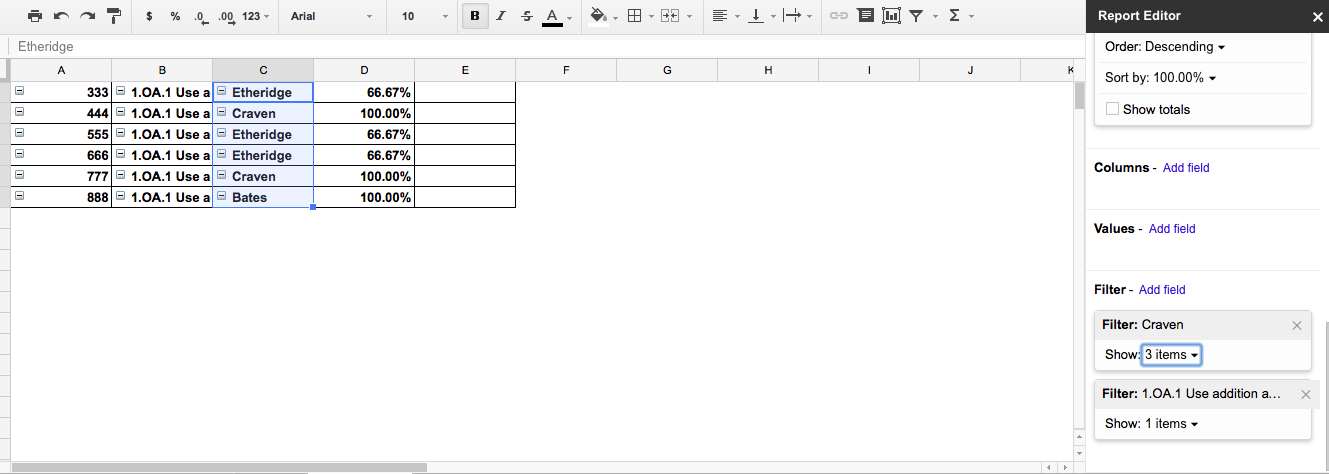
Only one DQC will be used for the team. When teachers create their Pivot Table Reports, they are able to pull their student's data.  Pivot Tables will be used as our digital data wall and used to helped each grade level to organize grouse for interventions and enrichments.

Pivot Table


Teachers will use the add-on Flubaroo to quickly grade the assessment. Fluabroo is an add-on that will automatically grade the forms, gives a summary of the responses, and emails students their results!!!!!

Flubaroo Spreadsheet

Email Letter to Student


Administrators will have access to the spreadsheet to monitor and support instruction.

Here is an example of the Form: Sample Daily Quality Checks 

There are many video tutorials to help you trainer staff on creating Google Forms and using Flubaroo and Pivot Tables. My favorite blog is Alice Keeler. Check her out!

To Flip our PDs, I have created video tutorials for our staff.
Creating and Sharing DQCs
Grading DQCs
Emailing Students and Feedback 

Check out tools to Flip your Staff Meetings and PD!

Be sure to leave a comment, follow me on Twitter @FITinEDU,  and subscribe to my blog!